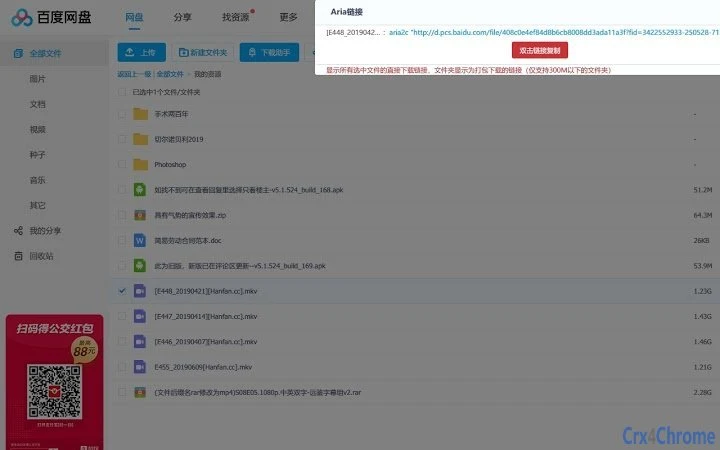

Baidu Network Disk Download Assistant
Download the Baidu Network Disk Download Assistant to extract real download links from Baidu Cloud shares. This tool helps users bypass download restrictions and access files directly from the Baidu network disk. It is designed for individuals who frequently download files from Baidu Cloud links, especially those shared via third-party websites or forums.
The assistant supports both Windows and Mac platforms, making it accessible to a wide range of users. The developer, syhyz1990, has created a lightweight utility focused on functionality and simplicity. It is ideal for users seeking a reliable method to retrieve direct download URLs without relying on third-party download services.
The tool is particularly useful for researchers, content curators, and digital archivists who need efficient access to shared resources.
Key Features & Capabilities
- Direct Link Extraction – Automatically retrieves the real download URL from Baidu Cloud share links, enabling faster and more reliable downloads.
- Browser Integration – Works seamlessly with web browsers to detect and process Baidu Cloud links on any page.
- Lightweight Design – Built for minimal system impact, ensuring smooth performance without high resource consumption.
- Open-Source Transparency – Available on GitHub, allowing users to inspect the code and verify functionality.
- Platform Compatibility – Supports both Windows and Mac operating systems, offering broad accessibility.
Users can paste a Baidu Cloud share link into their browser, and the assistant will analyze the page to extract the direct download address. This is especially useful when downloading large files or when third-party download tools are unreliable. The tool does not modify files or require account creation, preserving user privacy. It is ideal for bulk downloads or when working with time-sensitive content.
User Interface, Workflow & Performance
The interface of the Baidu Network Disk Download Assistant is minimal and focused on core functionality. It operates primarily through browser integration, requiring no complex setup. Users interact with it by pasting a Baidu Cloud link into the browser, and the assistant processes it in the background.
The workflow is streamlined: detection → extraction → display of direct link. No additional steps are required, making it efficient for repeated use. The tool runs silently and does not interfere with other browser activities.
Performance details were not specified by the developer. However, based on its lightweight design and open-source nature, it is expected to operate with low latency and minimal CPU or RAM usage. The assistant does not require constant background processes, which contributes to system stability. No reports of crashes or errors were included in the provided information. The developer did not specify resource usage details.
Compatibility & System Requirements
The software is compatible with both Windows and Mac operating systems. The exact version numbers and system requirements were not listed. Installation size is not specified.
Platform compatibility information is limited to the two major desktop platforms. The developer did not provide additional system requirements. Users are advised to ensure their system meets general browser and web application standards.
The assistant relies on browser functionality, so compatibility may depend on the browser’s support for extensions or scripts.
Pros and Cons
Pros
- Direct download link extraction from Baidu Cloud shares
- Open-source and transparent codebase
- Available for both Windows and Mac
- Lightweight and low system impact
- Free to use with no hidden costs
Cons
- No official support channels provided
- Performance details not specified
- Compatibility with all browsers not confirmed
- Limited documentation available
- No built-in update mechanism described
Is the Baidu Network Disk Download Assistant safe to use?
The tool is open-source and available on GitHub, allowing users to review the code for potential risks. However, users should only download it from the official repository and avoid third-party sources.
Can I use this tool without creating an account?
Yes, the assistant does not require any account creation or login. It operates directly on the provided Baidu Cloud link.
Does the assistant work with all Baidu Cloud links?
It is designed to work with standard Baidu Cloud share links. However, the developer did not specify whether all link types, including password-protected or expired links, are supported.
How often does the software receive updates?
The update frequency is not specified. Users are advised to check the GitHub repository for the latest version.
Is the tool available for Linux?
Based on the provided information, the tool is only confirmed for Windows and Mac. Support for Linux was not mentioned.
Final Thoughts + CTA
The Baidu Network Disk Download Assistant offers a straightforward and effective solution for retrieving direct download links from Baidu Cloud shares. Its open-source nature, lightweight design, and cross-platform availability make it a valuable tool for users who frequently access shared files. While detailed documentation and support are limited, the transparency of the codebase provides confidence in its reliability.
It is particularly beneficial for researchers, content managers, and anyone working with large file transfers. For those seeking a free, efficient way to bypass download restrictions, this tool delivers on its core promise. Download Baidu Network Disk Download Assistant now.







